.svg)

Store Operations: The last fifty meters of order routing

Key Takeaways
- Routing decisions are only as valuable as their execution. The Store Operations app connects both: every task on the store floor originates from a routing decision made by the network.
- The app is now generally available on Android and iOS with an identical feature set. New features arrive on all platforms at the same time, not in staggered rollouts.
- Picking, packing, handover, and returns now live in one application.
The Store Operations app is now generally available on Android and iOS. One app, one feature set, every platform.
Order routing has become remarkably intelligent. Modern order management systems weigh inventory positions, delivery promises, carrier cut-offs, and cost constraints in real time to decide which location should fulfill which order. The decision layer of commerce has never been smarter.
And then the order arrives at the store.
In many retail networks, this is where intelligence stops. The routing engine has made a precise decision, but on the shop floor that decision turns into a line in a list. No priorities on the device. No visibility of the carrier cut-off that made this order urgent in the first place. No connection between what the network decided and what the associate sees. Enterprises invest heavily in routing intelligence and then lose it in the last fifty metres, somewhere between the backoffice and the packing table.
That gap is expensive. Orders miss cut-offs not because the network chose the wrong store, but because the store never learned why the order mattered. Errors increase, click and collect promises slip, and across hundreds of stores, teams juggle multiple tools that were never designed to work together.
Closing the gap between decision and execution
The Store Operations app is built to close exactly this gap. It is the execution layer of the fulfillmenttools system: every task in the app originates from a routing decision. What the network decides, the store executes.
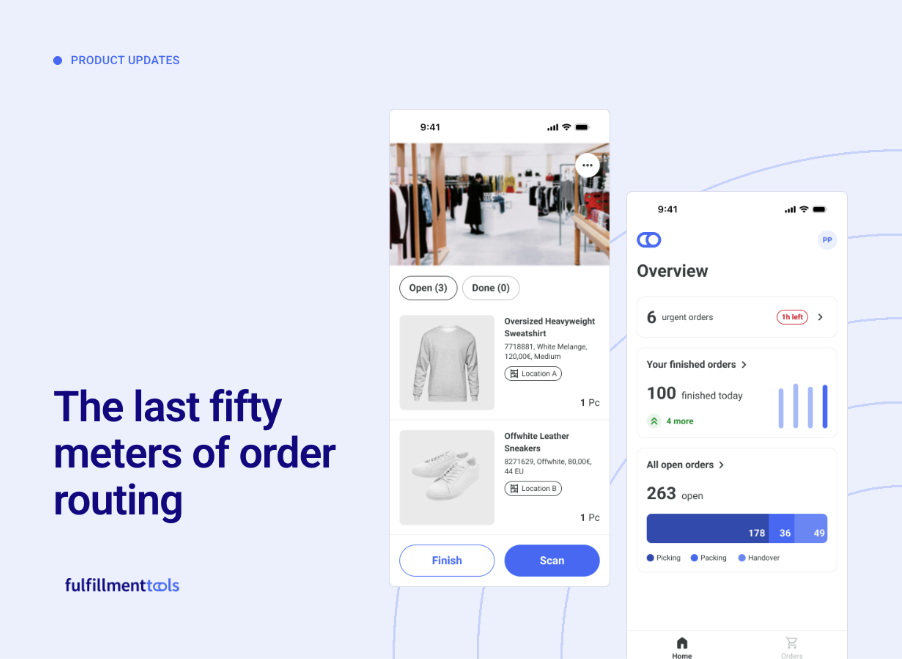
Now generally available, the app guides associates through picking, packing, and carrier handover on the device in their hand. A redesigned home screen shows open tasks, urgent orders, and facility performance at a glance. Urgent and overdue banners surface the orders that need attention first. Deadline visibility keeps every pick job aligned with carrier cut-off times, so the priority that the routing engine calculated actually reaches the person holding the parcel.
This is a different proposition from a standalone store app. A store app activates a location. An execution layer connects that location to the decisions of the entire network: real-time inventory, delivery promises, and routing logic all flow into the task list the associate sees. The store becomes a fully orchestrated fulfillment node, not an island with an app on it.
One app, any device
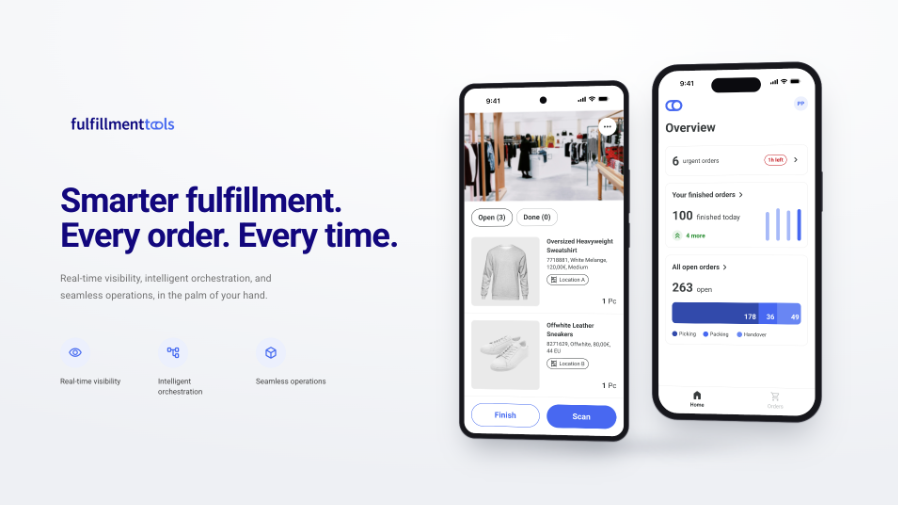
With this release, the Store Operations app is available on Android via the Google Play Store, on iOS via the App Store, and on any browser-based device.
That sentence carries more weight than it might appear to. Device landscapes in enterprise retail are rarely uniform. Some networks run Android handhelds, some have standardised on iOS, many operate browser-based terminals alongside both. Until now, that diversity often meant workarounds: retailers who had standardized on Apple hardware ran the web app in a browser because a native client was not available for their platform. One of our customers, a premium retailer with an iOS-first device strategy, did exactly that for months. Those workarounds end today.
Platform coverage is only half of the story. The other half is parity. Every capability of the Store Operations app is available on every platform, and every new feature will arrive on Android, iOS, and web at the same time. No staggered rollouts, no waiting for your platform to catch up, no feature matrix to check before an RFP response.
The release also consolidates the store toolset. Picking, packing, services, handover, and returns now live in one application. The previous standalone returns app is being retired, along with the legacy web app. Fewer applications on the shop floor means fewer logins, less switching, and less training effort for teams with high seasonal turnover.
Parity by architecture, not by promise
Feature parity across platforms is easy to announce and hard to sustain. Most vendors maintain separate codebases per platform, which means every new feature is built several times, tested several times, and shipped whenever each team is ready. Parity becomes a roadmap commitment that erodes with every release cycle.
We took a different route. All clients of the Store Operations app are built from a single Kotlin Multiplatform codebase. One implementation, tested once, shipped everywhere. Parity is not a promise we make, it is a property of the architecture. That distinction matters most twelve months from now, when the feature you request arrives on all of your devices on the same day.
Shipped, not announced
The path to this release is documented in our release notes. Guided packing entered beta in February. Picking followed in March. The full app reached public beta in April and general availability in June, within weeks of the originally communicated date. Four releases in five months, each one in production with real store teams before the next began.
Along the way, the app picked up details that only surface when you build with enterprise retailers rather than for them. One example: performance views can be configured to show facility-wide metrics instead of individual associate statistics. For retailers operating under works council agreements, that single configuration option can be the difference between a smooth rollout and a stalled one.
Available today
The Store Operations app is generally available now. Download it from the Google Play Store or the App Store, or run it as a web app on any browser-based device. Everything described here is in production today.
If you want to see the full loop in action, from routing decision to pick job to handover, visit the Store Operations product page or book a demo with our team. The last fifty metres are the part of fulfillment your customers actually see. It is worth getting them right.
[cg_inject-el="card"]
More on Store Operations
If you want to see the full loop in action, from routing decision to pick job to handover, visit the Store Operations product page or book a demo with our team. The last fifty metres are the part of fulfillment your customers actually see. It is worth getting them right.
FAQs
On which platforms is the Store Operations app available?
The app is generally available on Android via the Google Play Store, on iOS via the App Store, and on any browser-based device. All three clients offer the same feature set.
Do all platforms receive new features at the same time?
Yes. All clients are built from a single codebase, so every new capability arrives on Android, iOS, and web simultaneously. There are no platform-specific rollout schedules and no feature gaps between clients.
What happens to the previous web app and the standalone returns app?
Both are being retired. Returns handling is now part of the Store Operations app, alongside picking, packing, and carrier handover. Existing customers receive a migration timeline and guidance through their customer success contact, and the legacy applications remain available during the transition period.
We are an existing customer. What do we need to do?
Your customer success contact will guide you through the switch, including the migration from the legacy web app and the standalone returns app. The new app connects to your existing fulfillmenttools configuration, so facilities, users, and processes carry over without a separate implementation project.
Which processes does the app cover?
The app covers the complete in-store fulfillment flow: picking with prioritised pick jobs, guided packing, carrier handover, and returns processing. A redesigned home screen shows open tasks, urgent orders, and facility performance, with banners highlighting urgent and overdue orders.
How does the app relate to order routing?
Every task in the app originates from a routing decision made by the fulfillmenttools system. Priorities, deadlines, and carrier cut-offs calculated by the routing engine are visible directly on the associate's device, so store execution follows the logic of the entire network rather than a local list.
Can performance data be displayed without individual associate statistics?
Yes. Performance views can be configured to show facility-wide metrics instead of individual statistics. This configuration supports retailers operating under works council agreements or similar workforce policies.
Which devices and hardware do we need?
Any current Android or iOS smartphone or tablet works, as does any device with a modern browser. There is no proprietary hardware requirement, and mixed device landscapes across facilities are fully supported.
How do we get started?
Existing customers can contact their customer success team to plan the switch. If you are new to fulfillmenttools, book a demo through the Store Operations product page to see the app and the routing loop behind it in action.
Inspired by what you’ve read?
Talk to our team to explore how fulfillmenttools can support your growth.